JustOrder.Today JustOrder.Today JustOrder.Today JustOrder.Today
  • Features
    • V2 Features
    • V3 Features
    • V4 Features
    • Add On Features
  • Pricing
    • JustOrder.Today Upgrade Plan Calculator
  • Training
    • Training Overview
    • V4 Webinar
  • ResourcesNEW
    • Help & Support
    • FAQ For Customer
    • Blog
    • Payment Gateway Comparison
    • Revenue Monster x JustOrder.Today Application and Acknowledge Letter Offer
    • JustOrder.Today vs Shopify, Shopline, EasyStore, Wix: Basic Plan Feature Comparison
    • Merchants using JustOrder.Today
  • English
    • Chinese
Contact Us Now
Contact Us Now

Welcome

1
  • Help Center

Getting Started

3
  • Subscribe a Plan
  • Check status of Your Subscription
  • Get invoice for your subscription

Setup a Shop

5
  • Set up New Shop & Subdomain
  • Upload your business logo and business photos
  • Set up Opening Hours
  • Set up Estimated Preparation & Delivery Time
  • Set up Cut-Off Period

WhatsApp Whitelisting

1
  • WhatsApp Whitelisting Set Up

Delivery Settings (Charge to Customers)

7
  • How to Set Up Delivery Fee Charge by Area?
  • How To Set Up Self Pickup
  • How To Set Up Delivery Fees Charge to Customers?
  • How to Set Up Delivery Fee Charges via State Selection?
  • How to Set up Delivery Fee Charges via Distance/Weight?
  • How to Set up Delivery Fee Charges via Postcode/Weight?
  • How to Disable Customer Delivery/Self-Pickup Date Time Selection?

Delivery Settings (Integration with Services)

4
  • Integrate with Delyva
  • Integrate with Lalamove
  • Integrate with EasyParcel
  • Integrate with ParcelDaily

Payment Settings

2
  • How to enable manual bank transfer?
  • How to enable Cash On Delivery?

Product Settings

19
  • Set up Product Categories (do this before set up products)
  • Set up Products
  • How to upload product photos/videos?
  • How to improve and set up SEO for the product?
  • How to set wholesale pricing Tier for the product?
  • Understand Product Multiple Options and how to set up
  • Understand Product Single Option and how to set up
  • How to set up the product so that pre-order is required?
  • How to remark product code to the product?
  • How to enable the products can be purchased via reward points?
  • How to enable maximum quantity per order for the product?
  • How to enable minimum quantity per order for the product?
  • How to set available quantity for the product?
  • How to highlight/feature selected product on the top of the page?
  • How to organize the products shown in the website?
  • How to bulk upload products?
  • How to Update Product Price in Bulk?
  • How to change active status and update product quantity in bulk?
  • How to get the product listing in JustOrder.Today?

General Questions

16
  • How to Share Link to Your Customers?
  • How to Add Banner Photos to Your Website?
  • How to Show Pop Up Announcements/Highlights?
  • How to Change the Size of Shop Photos?
  • How to add Google Tag Manager Container ID?
  • How to add Facebook Pixel ID?
  • How to Change Default Shop Country Code for Customers Order Information Filling?
  • How to Change Default Shop Language in Your Page?
  • How to add social media button floating at the bottom of the page?
  • How to add WhatsApp button Floating at the Bottom of the Page?
  • How to Highlight Discounted Products?
  • How to Set up Customer Reviews?
  • How to Show Pop up in Ordering Page?
  • How to Require Customers to Fill in their NRIC/E-mail When Submitting an Order?
  • How to See My Website Visitor Performance?
  • How to Set up Business Off-days?

E-Invoice Settings

6
  • How To Set Tax Rate For Your Shop
  • Learn Export Sales Report
  • How to Check the Status of e-Invoice Submission?
  • How to submit e-Invoice to LHDN?
  • How to activate E-invoice in JustOrder.Today?
  • How to enable E-invoice Feature in Merchant Backend Portal?

Upload Products Properly

5
  • Product with more than 2 variations
  • Product with different size, flavours
  • Basic – Create a Product
  • Product sold in limited time
  • Product with different size, flavours

Promotion / Discount

5
  • Set Item Purchase Limit (For Member Only)
  • How to Set Up Promo Code Discount
  • How To Set Simple Product Discount
  • Set Up Bundle Promotions
  • Advance Add-On Promotions

Shop Decoration

3
  • Set Your Best Seller Category
  • Featured Products & Product Tagging
  • How to Set Your Shop Description

Payment Settings (Integration with Third Party)

6
  • Integrate with Revenue Monster
  • Integrate with Atome
  • Integrate with Stripe
  • Integrate with iPay88
  • Integrate with Billplz
  • Integrate with Fiuu (Razer)

Customer Loyalty Program

4
  • How to Set Sign Up Bonus
  • How to Set Birthday Rewards
  • How to Set Points Reward
  • How to Set Cashback and Share & Earn
View Categories
  • Home
  • Documentation
  • Payment Settings (Integration with Third Party)
  • Integrate with Revenue Monster

Integrate with Revenue Monster

Revenue Monster is a Malaysian payment gateway that supports multiple payment methods such as e-wallets, FPX, and QR-based payments. Integrating Revenue Monster allows your customers to pay securely and conveniently on your JOT store.

How to Integrate Revenue Monster #

In your merchant dashboard, go to Payment Gateways.
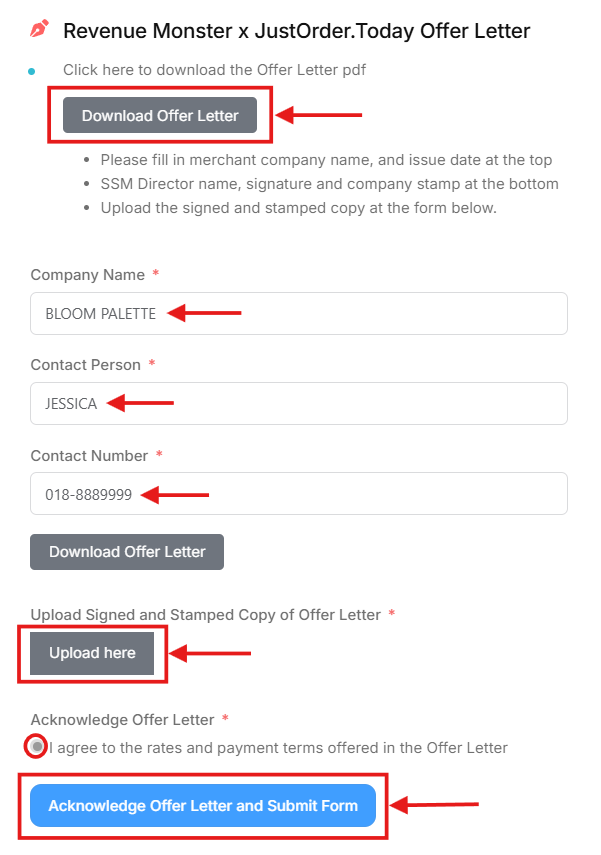
Click Revenue Monster at the top. Click the link “Apply Revenue Monster here” to register for a Revenue Monster merchant account.

Fill in all the required details, upload the necessary documents, tick the confirmation box, and click “Acknowledge Offer Letter and Submit Form.” Revenue Monster will email you the approval result after their review.
Once approved, return to this page in JOT and click “How to setup/find your API keys?”

  • Follow the instructions to obtain and input your API information.

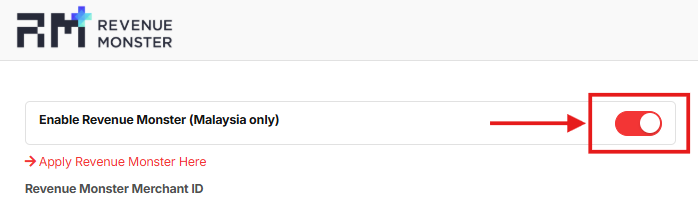
Turn on the Enable Revenue Monster toggle.
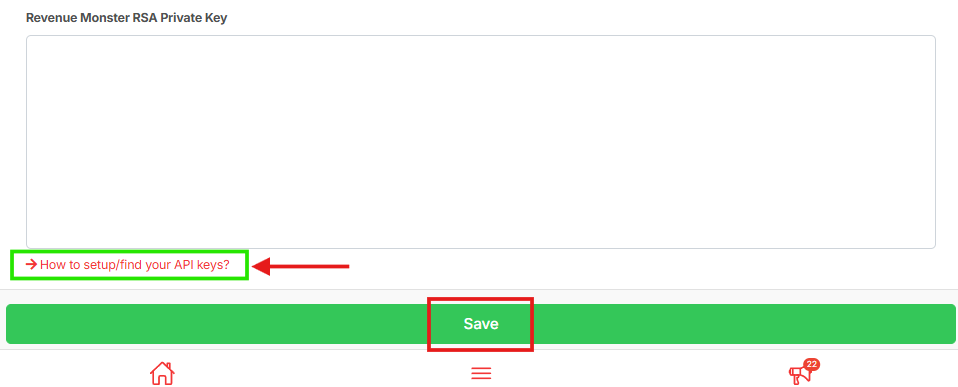
Click Save to activate this payment method for your shop.

Updated on December 4, 2025

What are your Feelings

  • Happy
  • Normal
  • Sad
Integrate with Atome
Table of Contents
  • How to Integrate Revenue Monster
  • Just Order Today Sdn Bhd 202101025639 (1425939-H)
  • justorder.sb@gmail.com
  • +6018-230 1130
  • 365-L, Jalan Pemancar, Taman Tun Sardon, 11700 Gelugor, Pulau Pinang
Facebook
Company
  • Overview
  • Features
  • Pricing
Resources
  • Blog
  • Help Center
  • Payment Gateway Comparison
Legal
  • Terms
  • Privacy Policy
  • © JustOrder.Today 2025 All Rights Reserved.
JustOrder.Today
  • Features
    • V2 Features
    • V3 Features
    • V4 Features
    • Add On Features
  • Pricing
    • JustOrder.Today Upgrade Plan Calculator
  • Training
    • Training Overview
    • V4 Webinar
  • ResourcesNEW
    • Help & Support
    • FAQ For Customer
    • Blog
    • Payment Gateway Comparison
    • Revenue Monster x JustOrder.Today Application and Acknowledge Letter Offer
    • JustOrder.Today vs Shopify, Shopline, EasyStore, Wix: Basic Plan Feature Comparison
    • Merchants using JustOrder.Today
  • English
    • Chinese
Contact Us Now