Sign Up Bonus allows you to reward new members immediately after they register an account in your store.
You can give them bonus cashback, bonus points, or both — a great way to encourage more people to sign up and start shopping.
Steps to set Sign Up Bonus #
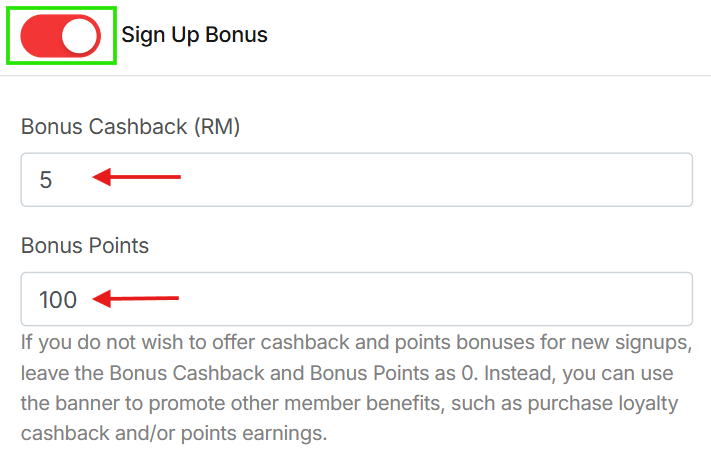
Go to your dashboard and navigate to “CUSTOMER LOYALTY“, then scroll down to the “Sign Up Bonus“.

Set the Bonus Cashback (RM) by enter the amount of cashback you want to give for each new signup. Example:
- Enter 5.00 → new members receive RM5 cashback.
Set the Bonus Points by enter the number of points new members will receive. Example:
- Enter 100 → new members receive 100 points.
Important Note #
If you do not wish to offer cashback or points bonuses for new signups, simply leave Bonus Cashback and Bonus Points as 0.
You can still use the signup banner to promote other member benefits, such as:
- Purchase Cashback Rewards
- Points Earnings
- Birthday Rewards
- Share & Earn rewards
This helps attract signups without giving immediate bonuses.
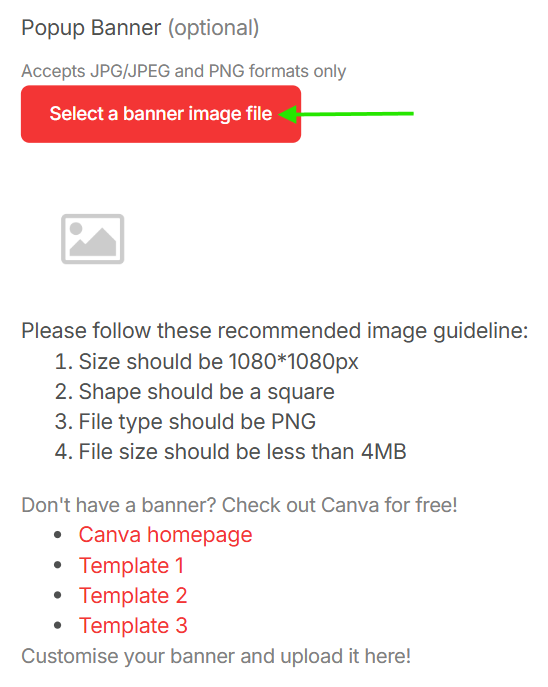
You may follow the steps to upload your Popup Banner. Save all your setting.