Points Reward allows your customers to earn points whenever they spend in your store. They can redeem these points as cashback on their next purchase. This helps increase repeat purchases and customer loyalty.
⚠️ Points will only be rewarded after the order becomes Completed & Paid.
Steps to Set Up Points Reward #
Go to your dashboard and navigate to “CUSTOMER LOYALTY“.

Find the Points Reward section and switch the toggle ON to enable this feature.
Set how many points customers earn
In “Points every RM1.00 spent”, enter the number of points customers will receive for each RM1 they spend. Example:
- Enter 1 → customer spends RM100 = earns 100 points
- Enter 2 → customer spends RM100 = earns 200 points
In “Cashback (RM) on every 1 point redeemed”, enter how much 1 point is worth. Example
- Enter 0.01 → 1 point = RM0.01
- That means 100 points = RM1
In “Day(s) before expiring”, enter how long points remain valid (default is 30 days). Points not redeemed within the expiry period will automatically expire.
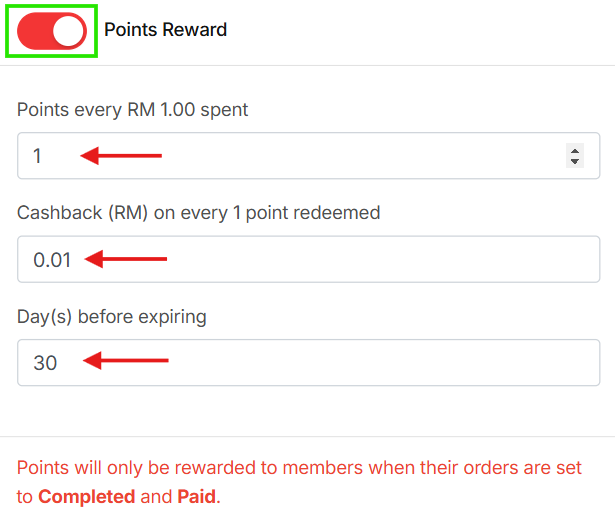
Once saved, customers will start earning points automatically after their orders are Completed & Paid.
