Birthday Rewards allow you to give customers extra cashback or extra points during their birthday period.
This helps build customer loyalty and makes them feel appreciated.
Steps to Set Up Birthday Rewards #
Go to your dashboard and navigate to “CUSTOMER LOYALTY“, then scroll down to the “Birthday Rewards“.

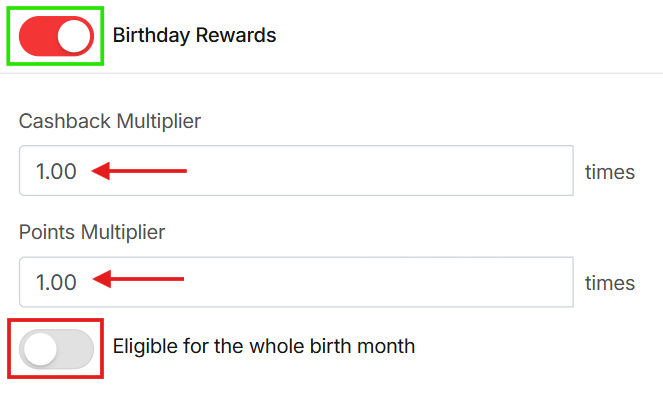
Enable the Birthday Rewards by switching the toggle to ON.
Set the Cashback Multiplier. This controls how many times the normal cashback your customer will receive on their birthday. Example:
- 1.00 = normal cashback (no extra)
- 2.00 = double cashback
- 3.00 = triple cashback
Set the Points Multiplier. This controls how many times the normal points your customer will receive. Example:
- 1.00 = normal points
- 2.00 = double points
- 3.00 = triple points
Choose Birthday Eligibility (optional).
- Turn on “Eligible for the whole birth month” if you want customers to enjoy rewards for the entire month of their birthday.
- If this is OFF → rewards apply only on the birthday date.
Submit your settings. Birthday bonuses will now be applied automatically when eligible customers place an order.
