JustOrder.Today JustOrder.Today JustOrder.Today JustOrder.Today
  • Features
    • V2 Plus Features
    • V3 Plus Features
    • V4 Features
    • Add On Features
  • Pricing
    • Plan Pricing
    • JustOrder.Today Upgrade Plan Calculator
  • Training
    • Training Overview
    • V4 Webinar
  • ResourcesNEW
    • Help & Support
    • FAQ For Customer
    • Blog
    • Payment Gateway Comparison
    • Revenue Monster x JustOrder.Today Application and Acknowledge Letter Offer
    • JustOrder.Today vs Shopify, Shopline, EasyStore, Wix: Basic Plan Feature Comparison
    • New Merchants Onboarding Set Up Store Directory
    • Merchants using JustOrder.Today
  • English
    • Chinese
Contact Us Now
Contact Us Now

Getting Started

1
  • How to subscribe to JustOrder.Today?
View Categories
  • Home
  • Documentation
  • General
  • Getting Started
  • How to subscribe to JustOrder.Today?

How to subscribe to JustOrder.Today?

Step 1: Register a JustOrder.Today account #

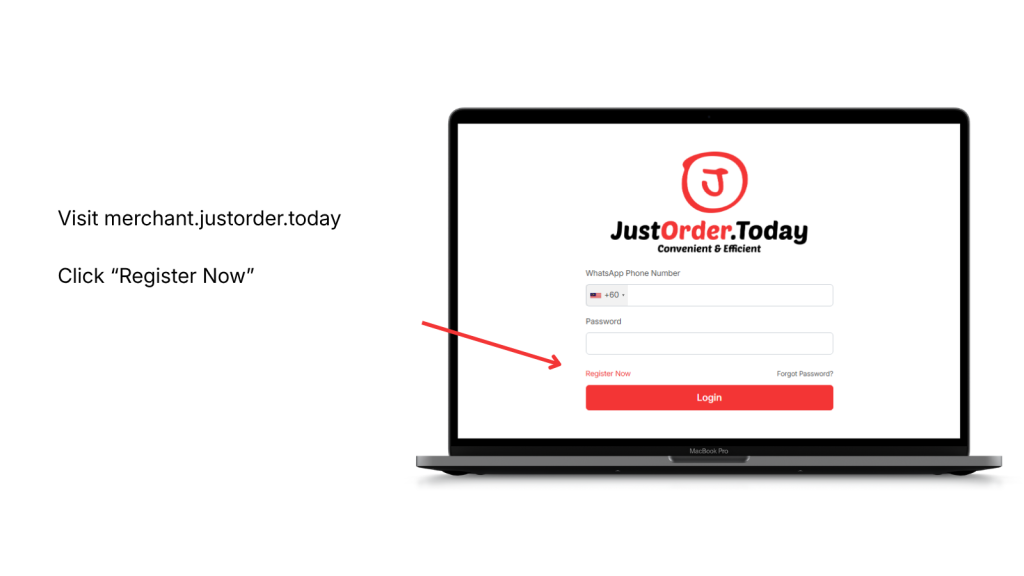
Visit merchant.justorder.today.

Click “Register Now” on the login page.
Step 2: Fill in your registration details #

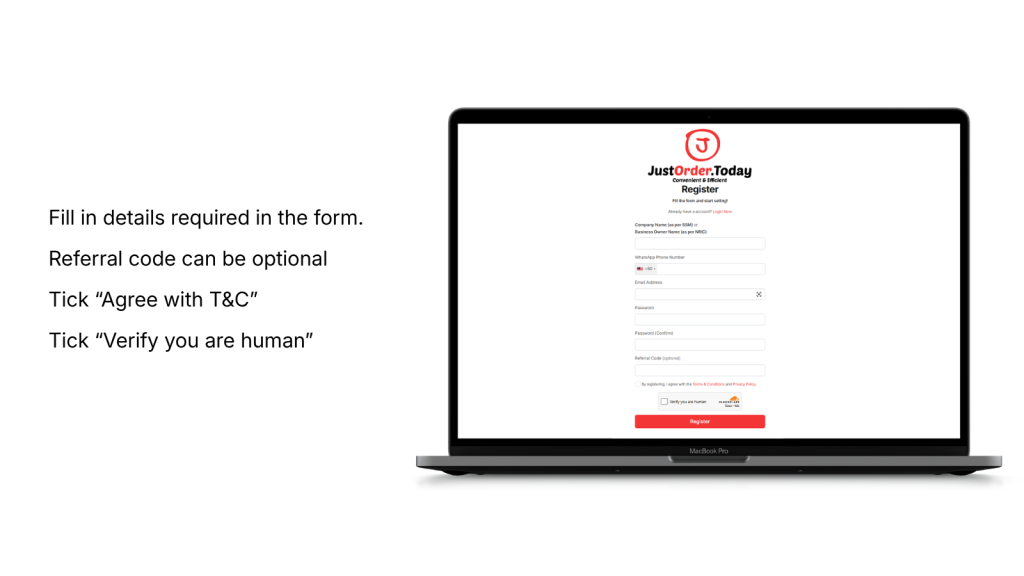
Complete all required fields in the registration form.

You may leave the Referral Code blank if you do not have one.

Then:

  • Tick “Agree with T&C”
  • Tick “Verify you are human”
  • Click “Register”

Step 3: Set up your first shop #

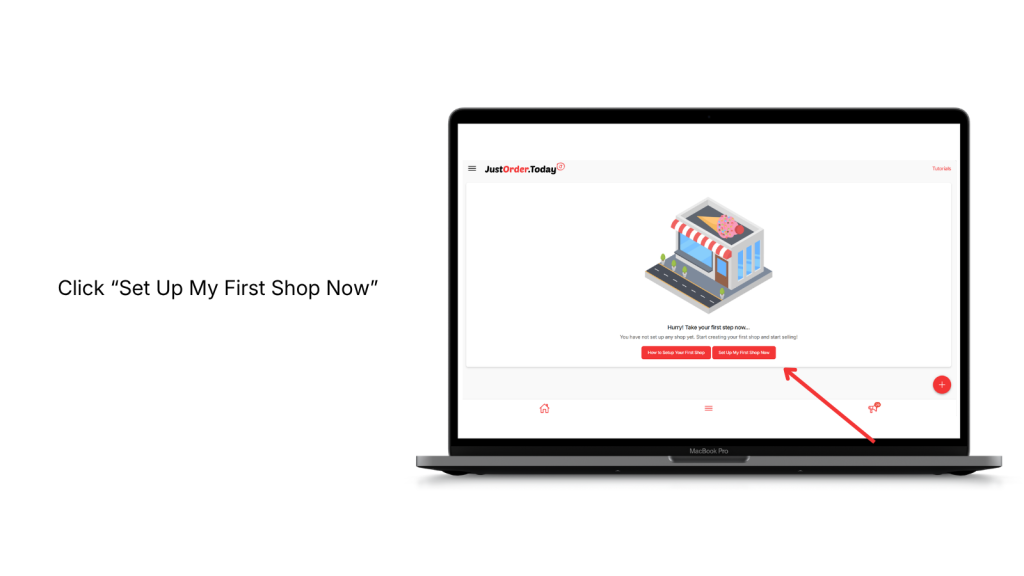
After registration, click “Set Up My First Shop Now”.

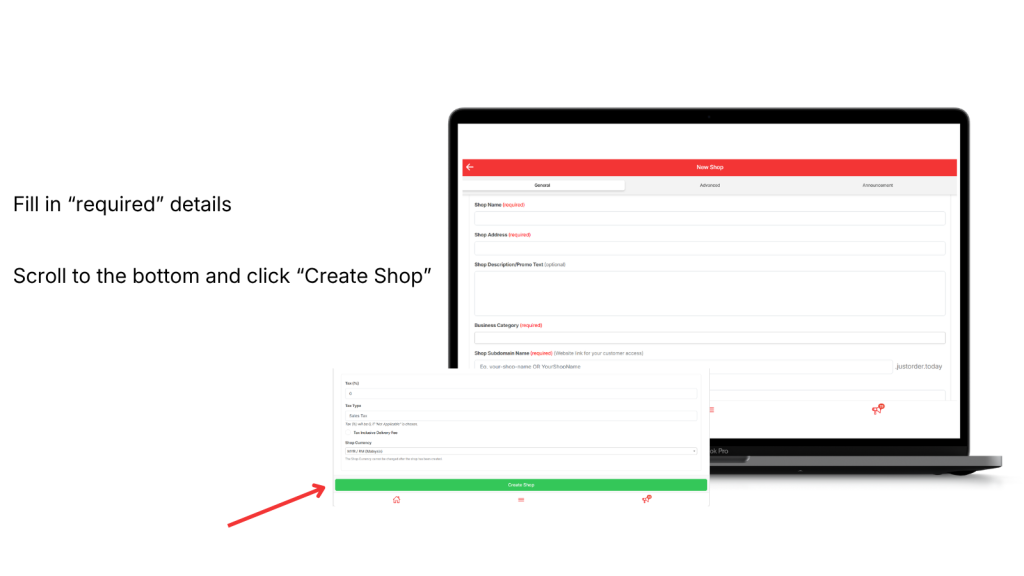
Fill in all required shop details.

Scroll to the bottom and click “Create Shop”.
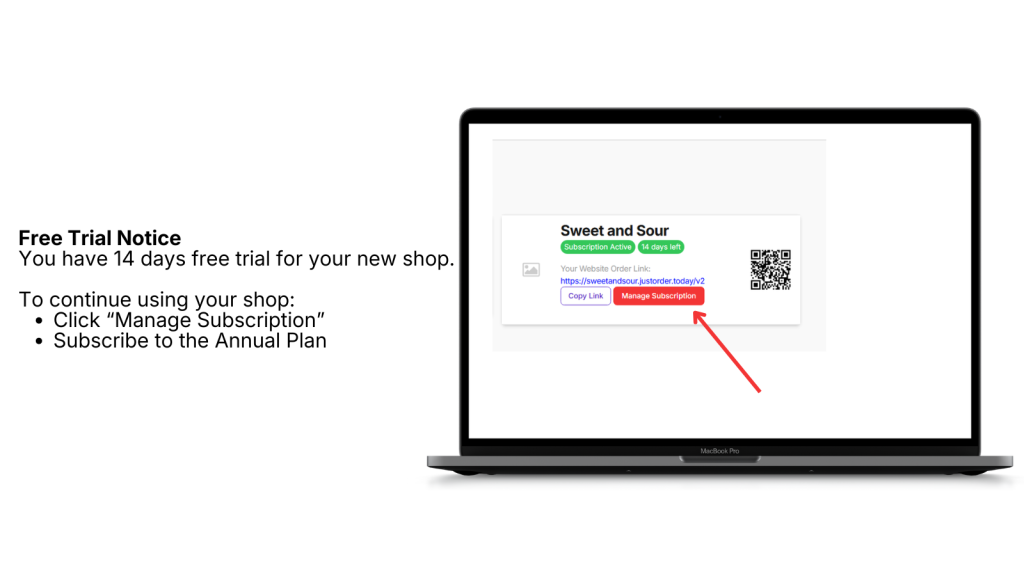
Step 4: Free trial starts automatically #

Once your first shop is created, your shop will be activated with a 14-day free trial.

To continue using your shop after the trial, click “Manage Subscription”.
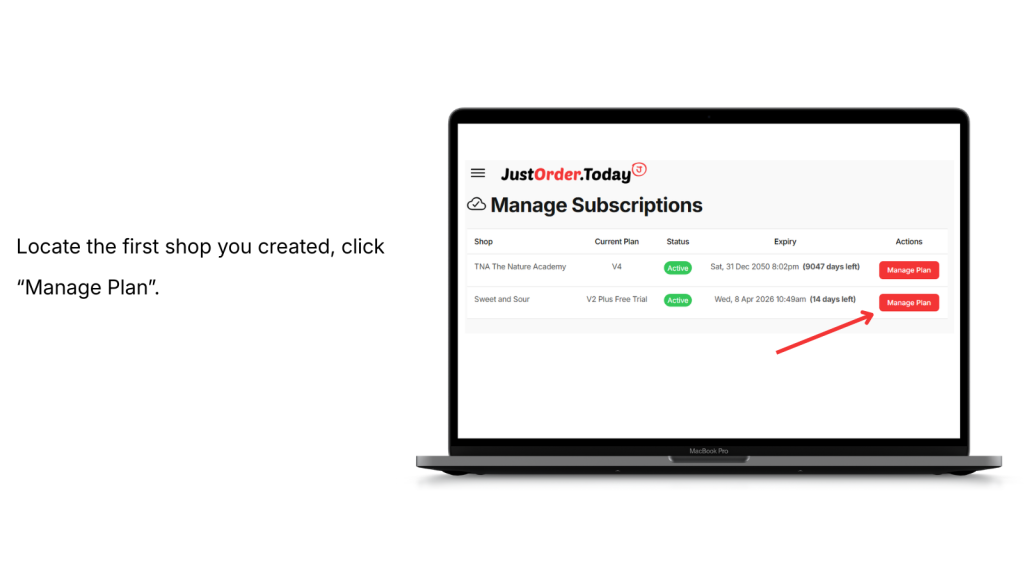
Step 5: Open Manage Subscriptions #

Locate the shop you want to subscribe for.

Click “Manage Plan” beside the shop.
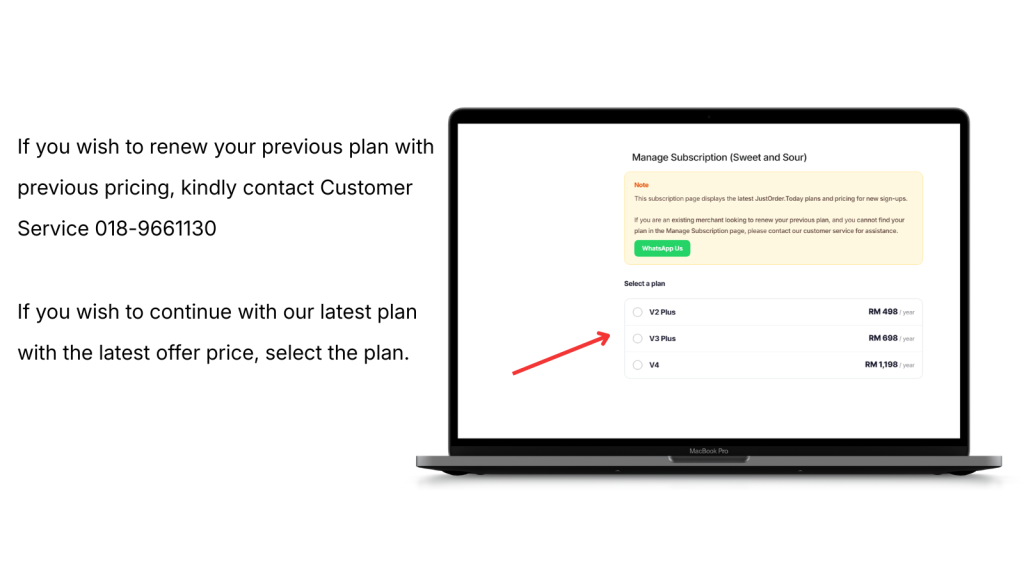
Step 6: Choose your subscription plan #

On the subscription page, select the plan you want.

If you want to continue with the latest plan and latest offer price, simply select your preferred plan.

If you wish to renew your previous plan with previous pricing, please contact Customer Service: 018-9661130.
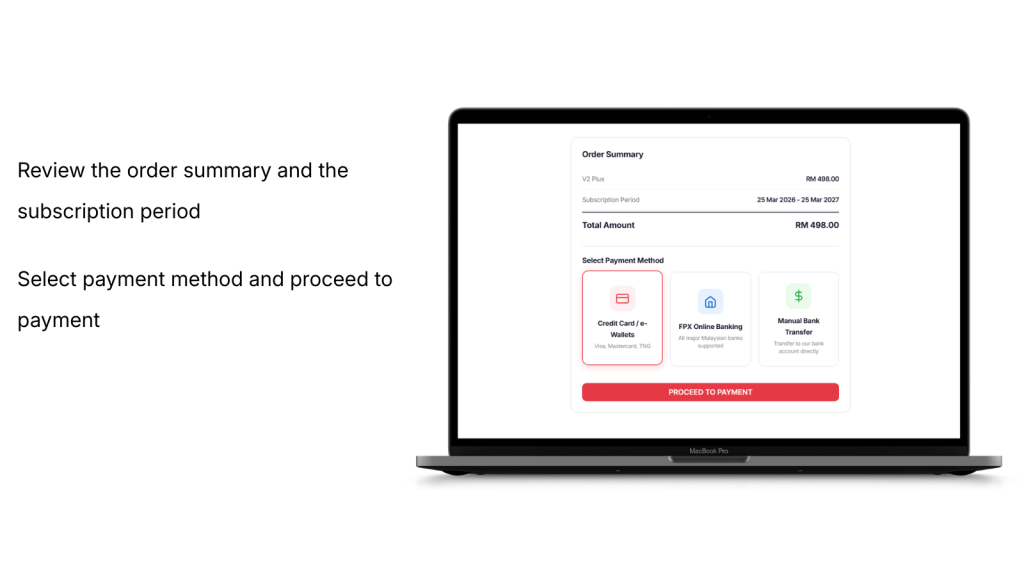
Step 7: Review your order summary #

Check the order summary and subscription period carefully.

Then choose your preferred payment method and click “Proceed to Payment”.
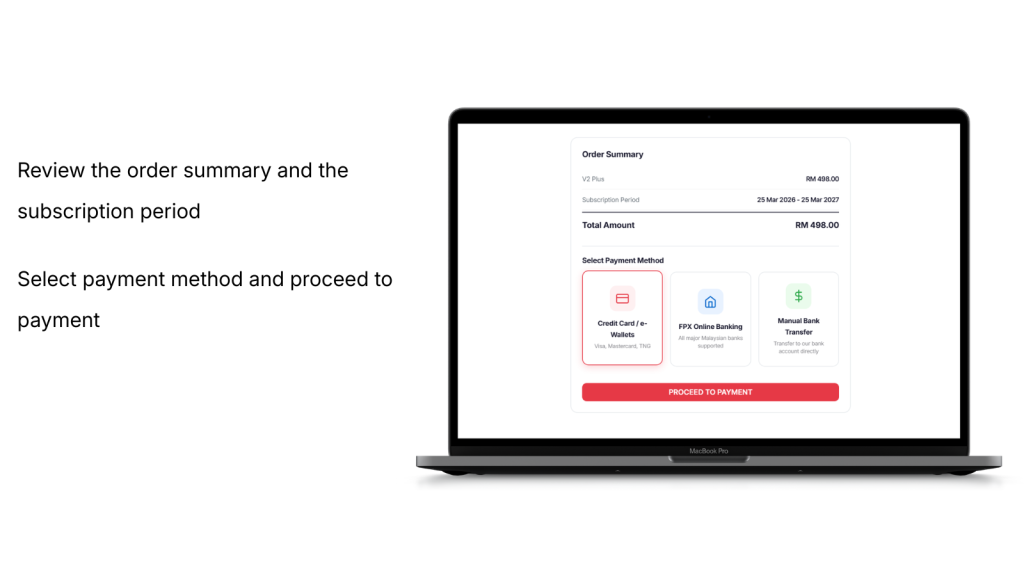
Step 8: Complete payment #

Select your payment method:

  • Credit Card / e-Wallets
  • FPX Online Banking
  • Manual Bank Transfer

Proceed with payment and complete the transaction.
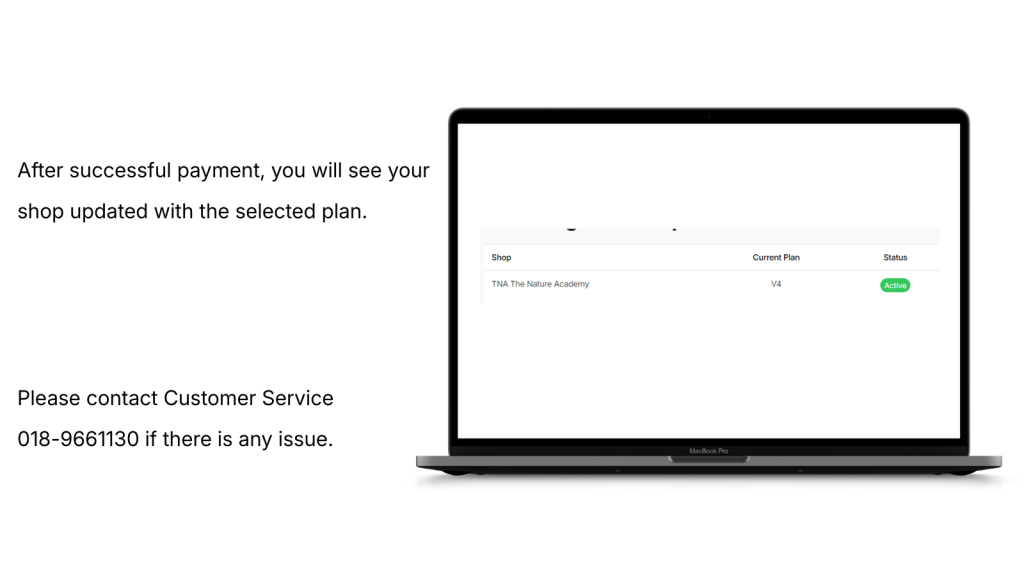
Step 9: Subscription activated #

After successful payment, your shop will be updated with the selected plan.

If you face any issue, please contact Customer Service: 018-9661130.
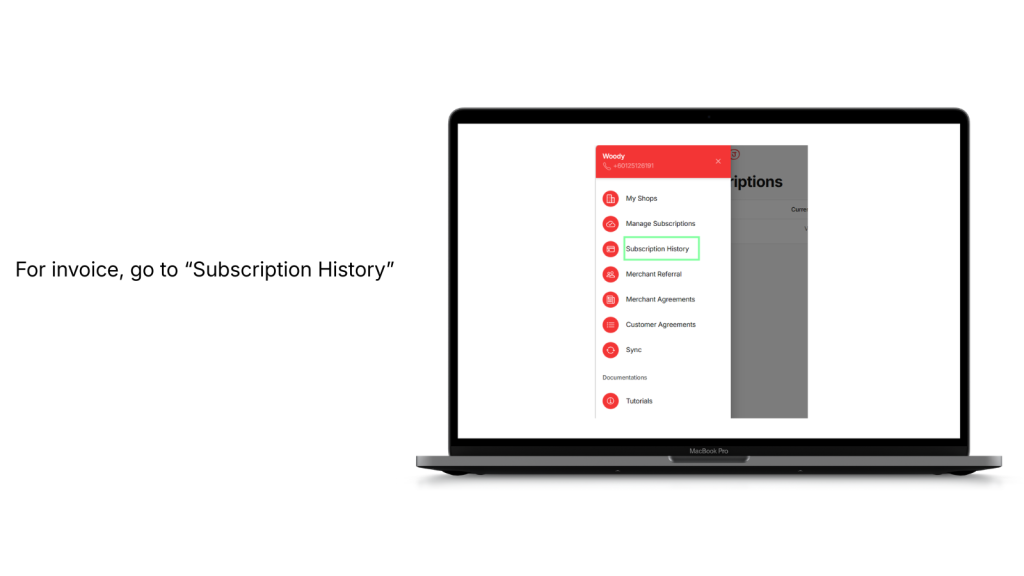
Step 10: Download your invoice #

To view your invoice:

  • Open the menu
  • Go to “Subscription History”

Click the red Invoice No. to view and download your invoice.


Quick Summary #

  1. Register account
  2. Create your first shop
  3. Enjoy 14-day free trial
  4. Click Manage Subscription
  5. Select a plan
  6. Make payment
  7. Subscription activated
  8. Download invoice from Subscription History
Updated on March 25, 2026

What are your Feelings

  • Happy
  • Normal
  • Sad
How to subscribe to JustOrder.Today?How to subscribe to JustOrder.Today?
Table of Contents
  • Step 1: Register a JustOrder.Today account
  • Step 2: Fill in your registration details
  • Step 3: Set up your first shop
  • Step 4: Free trial starts automatically
  • Step 5: Open Manage Subscriptions
  • Step 6: Choose your subscription plan
  • Step 7: Review your order summary
  • Step 8: Complete payment
  • Step 9: Subscription activated
  • Step 10: Download your invoice
  • Quick Summary
  • Just Order Today Sdn Bhd 202101025639 (1425939-H)
  • justorder.sb@gmail.com
  • +6018-230 1130
  • 365-L, Jalan Pemancar, Taman Tun Sardon, 11700 Gelugor, Pulau Pinang
Facebook
Company
  • Overview
  • Features
  • Pricing
Resources
  • Blog
  • Help Center
  • Payment Gateway Comparison
Legal
  • Terms
  • Privacy Policy
  • © JustOrder.Today 2025 All Rights Reserved.
JustOrder.Today
  • Features
    • V2 Plus Features
    • V3 Plus Features
    • V4 Features
    • Add On Features
  • Pricing
    • Plan Pricing
    • JustOrder.Today Upgrade Plan Calculator
  • Training
    • Training Overview
    • V4 Webinar
  • ResourcesNEW
    • Help & Support
    • FAQ For Customer
    • Blog
    • Payment Gateway Comparison
    • Revenue Monster x JustOrder.Today Application and Acknowledge Letter Offer
    • JustOrder.Today vs Shopify, Shopline, EasyStore, Wix: Basic Plan Feature Comparison
    • New Merchants Onboarding Set Up Store Directory
    • Merchants using JustOrder.Today
  • English
    • Chinese
Contact Us Now